Sunday, October 7, 2012

Poinsettia Christmas Cheer

I love Pinterest.  Really...but as I was telling a friend this weekend, it is such a blessing and a curse!
It is so full of ideas and information, I would totally be lost if it went away.  And my family would starve, too!  Just kidding, they don't get to eat anyway, I'm always on Pinterest!!!

Anyway, I saw this card by KittieKraft and knew I'd have to copy it.

And I know it is only October, but I have Christmas cards on the brain!
Especially since I have this month's SOTM on my desk...staring at me...calling out to me.Smiley from millan.net

So one more card for now, then maybe I can get some Halloween things made.

This card was another quick and easy one to put together.  All the cuts were made with the Artiste cartridge. 

Stamps: Very Merry Christmas October 2012 SOTM
Inks: Ponderosa Pine, Ruby, Creme Brulee marker
Papers: White Daisy, Ponderosa Pine, Ruby cardstock
Accessories: Pearl Opaques, Gold organdy ribbon
Tools: Artiste Cricut cartridge, Rub-On Tool, Spray Pen


Did you know you can make a poinsettia with a star?Smiley from millan.net 

Pretty neat, right?  Here is how I put it together:

I used the star on pg. 80 of the handbook, cut in various sizes: two at 3.25" in Ponderosa Pine, and one of each at 3", 2.75", 2.5", and 2.25" in Ruby.  Flowers are not flat, so I placed them on my VersaMat and used my Rub-On Tool to gently roll around the center of each leaf/petal piece.  It curled it up nicely.  I layered it, rotating each piece as I went.  Then gave the whole thing a couple of squirts of water with my Spray Pen.  I rolled the layers up a little more and centered it in my frame.

The frame is found on pg. 60.  I cut it at 5.25" and again at 4.75" out of White Daisy and layered them.  After all the pieces were in place, I colored some Pearl Opaques with my Creme Brulee alcohol marker and placed them in the middle of the petals.  I cut some strips of ribbon, made some loops and placed them under the leaves.  Then I stamped the sentiment from the Very Merry Christmas stamp set in Ruby ink.  That was it!

This is a big card, 6" x 6" and very dimensional so I won't be mailing it!  But it will fit nicely in boxes that are being shipped for the holidays.

Oh!  That reminds me, I have to start my Christmas shopping soon!  Smiley from millan.net

How about you??


Thursday, October 4, 2012

A Very Merry Christmas Card

I'm so pleased that so many of you liked my ornament I posted the other day!  It warms my heart.
  Smiley from millan.net
Thank you!

Today I'm going to share another card I've made with the Very Merry Christmas SOTM set.  This time I was going for more of a rustic Christmas look.

Stamps: Very Merry Christmas October 2012 SOTM
Inks: Desert Sand, New England Ivy, Ruby
Papers: Colonial White, Ruby, Kraft cardstock
Accessories: Create a Shade Pearl Paint
Tools: Paper Piercer, Square punch, Spray Pen


This was an easy and quick card to put together.  I mixed up some Create a Shade Pearl paint and water in the Spray Pen to give the Kraft cardstock a bit of shimmer.  Then I paper pieced the tree and gifts.  The banner was made with a strip of cardstock and I used the square punch to notch out the end.  And that was it!  May have to use this as some of my cards this year.
It's about that time to get started! Smiley from millan.net


Want to make your own card?  Get all your supplies over at my website!  And be sure to JOIN the October Craft Closet Spooktacular when you place your order...your name will be put into a drawing for $25 in select CTMH product when you do!


Wednesday, October 3, 2012

Clearly the Best: Dauber Dynamite

Have you every wanted to add rainbows of color to your artwork?   Watch the newest video from MyCraftChannel and learn how easy it can be from Kristine and Monica.


Tuesday, October 2, 2012

Very Merry Christmas Ornament Tutorial: Part 2

Alright, who's ready to finish off their ornament from Part 1Smiley from millan.netThen let's get started!


This is what we've finished so far.
Just set this aside for now and we'll create the center embellishments.


1.  Take the two 12" strips of cardstock and begin accordian folding them both.


2.  You should end up with nice, tight accordians.


3.  Take your favorite adhesive and attach one end of the White Daisy strip to the other,
overlapping the edges, to create a ring.


4.  Gather one edge of the ring towards the center and push down, creating a rosette.
Take the 2" White Daisy circle and cover it with Liquid Glass.
Attach this to the center of the rosette.
(It doesn't have to be exactly centered.  This just makes a base for the rosette to attach to.)


5.  Use a block or some other object to set on top of the rosette as it dries.


6.  When it has dried, use the Silver Glitz Glitter Gel to edge the rosette.  Let it dry.


7.  Take the Twilight strip and repeat steps 3 & 4, except instead of attaching it to a circle base,
place Liquid Glass on the White Daisy rosette and place the Twilight rosette on top, fitting it in the folds, as shown in the photo.  Place theblock on top and let dry.


8.  Add more Silver Glitz to the edge of the Twilight rosette.


9. Did you know you can color embroidery floss with our alcohol markers?  Take a long string of floss, 7"-10" (whatever your fingers will be comfortable tying in a bow) and color with the Twilight marker.  Use the blending marker to smooth out the color if you wish.


10.  I forgot to take step by step photos of this next embellishment...sorry.
  • Stamp the "A Holiday Treat" image from the stamp set onto the Shift/Accent 4 White Daisy cut out.
  • Edge the 1" White Daisy circle with Silver Glitz.  Attach to stamped image with 3-D foam tape.
  • Add Sparkles to the stamped image as shown.
  • Thread the Twilight floss through a large Bling button and attach to the circle with a Glue Dot.


11.  Now you should have all 3 main pieces as shown.


12.  Take the 1" x 3" White Daisy piece and fold along the score lines.


13.  This creates a base for the rosette to attach to.


14.  Use Liquid Glass to attach it to the center of the ornament base.


15.  Use Liquid Glass to attach the rosette to the ornament base.


16. Use Liquid Glass to attach the center embellishment to the rosette.
Now your ornament is complete!


17.  For the hanger, take the 16" ribbon piece and, using Glue Dots, fold over the ends as shown.


18.  Flip the ornament over.  Note where the top of it is before you attach the ribbon.


19.  Attach the ends of the ribbon with Glue Dots.


20.  Cover the back with Liquid Glass and the remaining 3" circle.


21. Flip it right side up again.  Make sure your ribbon is nice and flat.


22.  With White Daisy embroidery floss, thread a small Bling Button and tie around the ribbon hanger, just above the ornament.
 
There!  You're finished! Smiley from millan.net


Engineer had a good idea.  He wanted me to make two and attach them back to back.  And I may do this, just for fun...but after I've had a nap!
Smiley from millan.net

If you create one of these for yourself, please let me know! I'd love to see it!


Very Merry Christmas Ornament Tutorial: Part 1

Smiley from millan.net  Thank you everyone for all the nice comments you left me on the Blog Hop post and FaceBook!  It really means a lot to me!  I spent yesterday editing photos for the tutorial so you can make one for your very own.

It's not hard to put together, just a lot of steps.  So I've broken it up into 2 parts.  This post will show you how to make the base of the ornament, the next one will show you how to make the center embellishment and hanger.  And by all means, make it your own!  If you'd like to change something from what I've done, please do!  But I'd love to see what you created when you're done.  
Ready to get started?  Smiley from millan.net

Supply/Tool ListSmiley from millan.net
  • White Daisy cardstock
  • Twilight cardstock
  • Twilight ink
  • Very Merry Christmas stamp set
  • Silver Glitz Glitter Gel
  • Twilight Marker
  • Alcohol Blending Marker
  • Slate Satin Polka-Dot Ribbon
  • Bling Assortment buttons
  • Sparkles
  • White Daisy Embroidery Floss
  • Liquid Glass
  • Glue Dots & Mini Glue Dots
  • Artiste Cricut cartridge
  • Scoring Stylus
  • Paper Piercer
  • Blocks
  • Scrubber/Spritz


Cutting Your Pieces  Smiley from millan.net
(though I recommend a Cricut and paper trimmer over the chainsaw)
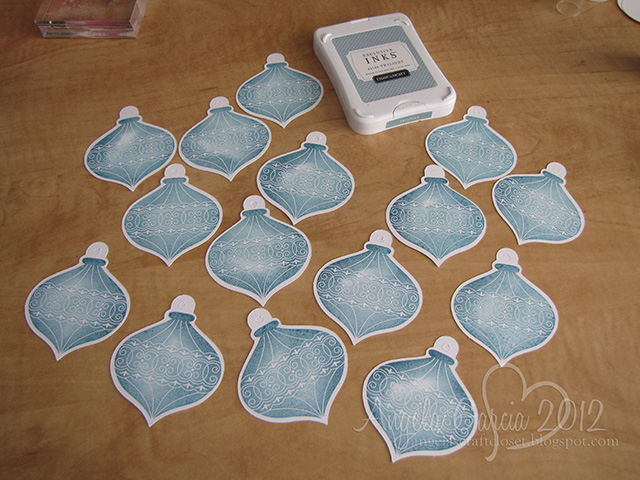
  1. Cut 20 ornament images at 3" (pg. 79 in the Artiste booklet) in White Daisy cardstock.  (One of the great things about our stamp sets that coordinate with our Cricut cartridges is the measurements for the images are right on the stamp sheet. No need to measure or guess what size to cut your image!)
  2. Cut 20 complimentary ornament images at 2½" in Twilight cardstock. (I used the ornament on pg. 47 of the Art Philosophy cartridge.  But any of the ornaments on pg. 53 of the Artiste handbook would work as well.  Just a matter of preference!)
  3. Cut two 3" circles, a 2" circle, and a 1" circle in White Daisy cardstock. (pg. 48 in the Artiste booklet).
  4. Cut the  Shift/Accent 4 image (pg. 79 in the Artiste booklet) at 1 ¾" in White Daisy cardstock.
  5. Cut a 1½" x 12" strip of White Daisy cardstock.  Score this at every ¼".
  6. Cut a 1" x 12" strip of Twilight cardstock.  Score this at every ¼". 
  7. Cut a 1" x 3" piece of White Daisy cardstock.  Score this at  ½", 1", 2", and 2½".
  8. Cut five 5¾" pieces of the Slate Satin Ribbon.
  9. Cut a 16" piece of the Sate Satin Ribbon.


Putting It TogetherSmiley from millan.net


1. Stamp the ornament image onto 15 of the White Daisy cut outs.  Score down the middle.


2. Score 15 of the Twilight ornaments down the middle.


3. Take one of the scored ornaments and apply Liquid Glass to one side.


4.  Attach another ornament piece, then apply Liquid Glass to it's other half. 


5.  Attach a 3rd ornament, then apply Liquid Glass over the whole back.


6. Attach an unscored ornament piece to the back of the whole thing, creating a base.
Repeat steps 3-6 until you have 5 sets put together.


7. Do the same thing with the Twilight ornament pieces.


8.  When you've finished, you should have 10 3-D ornament pieces.


9.  Take the Silver Glitz Glitter Get and apply it to every edge.
(These photos show Glitz only on the raised edges, but I did go back over the outer edges with the Glitz.)


10.  Take one of the 3" White Daisy circles and attach the tops of the ornament pieces to it with Liquid Glass.  Set this aside for now.


11.  Take the 5 strips of ribbon and Mini Glue Dots.  Place one glue dot at the edge of the ribbon, centered along the long side.  You can almost see where it is in the photo.


12.  Pinch the two center edges together as shown in the photo.  Use your piecer to place another glue dot where indicated by the arrow.


13.  Rotate the ribbon and press down, creating a point on the ribbon.  Place another glue dot where indicated by the arrow.


14.  Flip the ribbon over and create another point on the ribbon.


15.  Do this with all 5 ribbon strips.


16.  Take the ornament base and add the ribbon points between each stamped ornament with Liquid Glass or regular Glue Dots.


17.  Add Glue Dots to the back of the Twilight ornaments (or use Liquid Glass) and attach to the center of the ribbon points.


Now you've completed the base of the ornament.  That wasn't so hard, was it? Smiley from millan.net

Stay tuned for Part 2!
Smiley from millan.net

Shareaholic

Related Posts Plugin for WordPress, Blogger...